
Chapter 1: Calibration and Debugging – Welding Torch Calibration

Chapter 1: Calibration and Debugging

Welding Torch Calibration

Step - 1

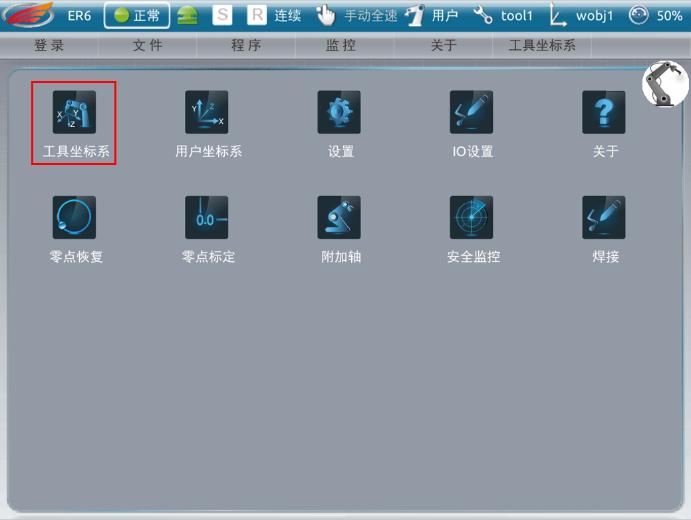
On the main interface of the teach pendant, select the Tool Coordinate System.

Step - 2

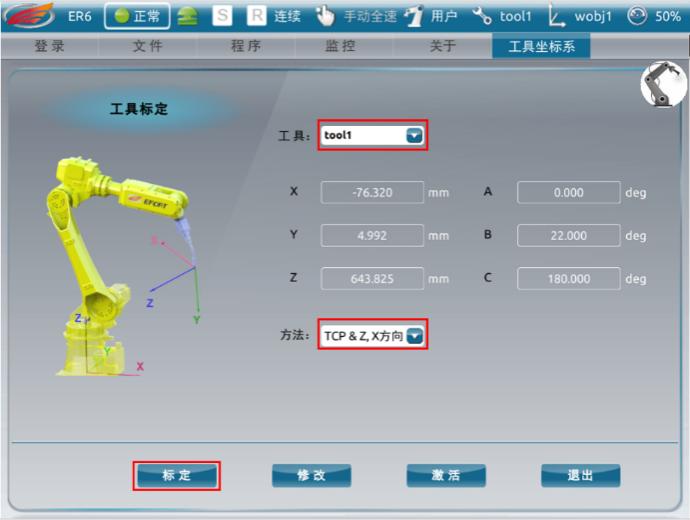
1. Select Tool: tool1 

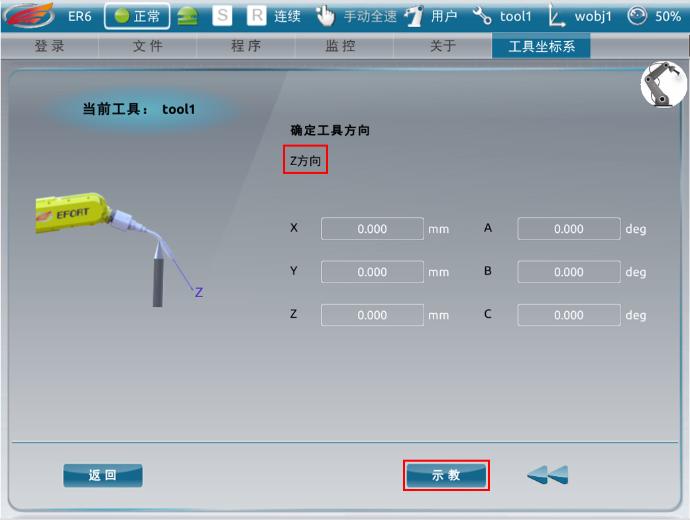
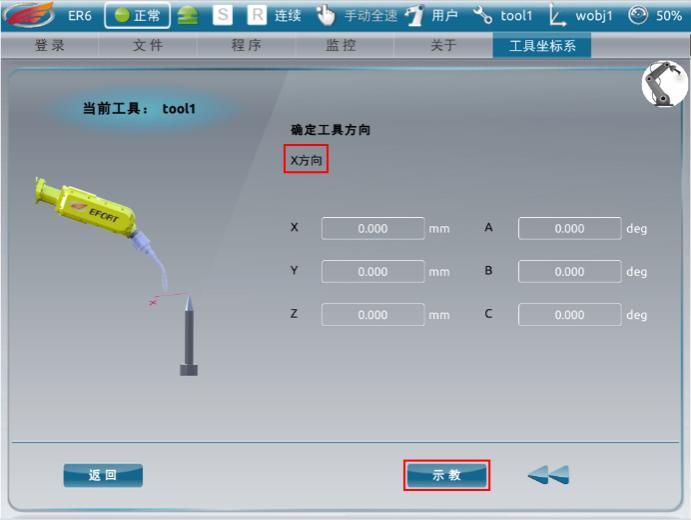
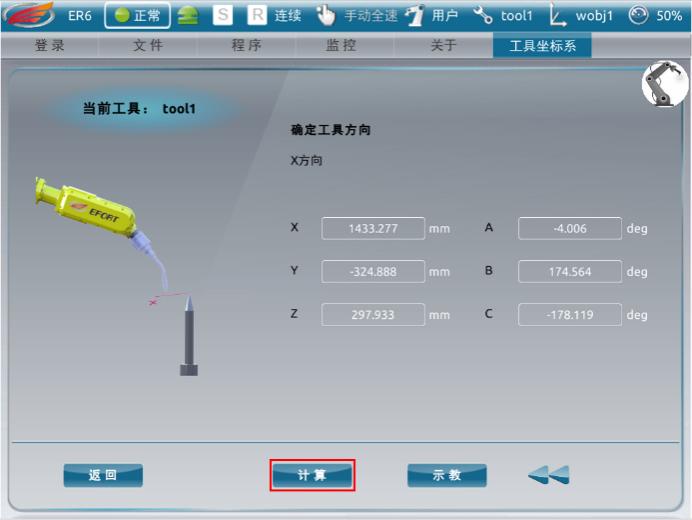
2.Select Method: TCP & Z, X Direction 

3. Click Calibrate

Step - 3

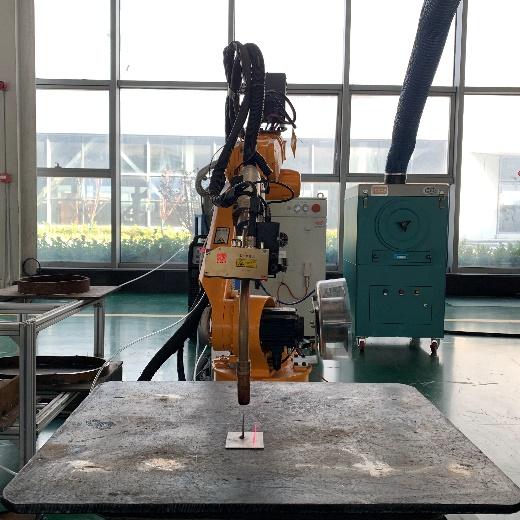
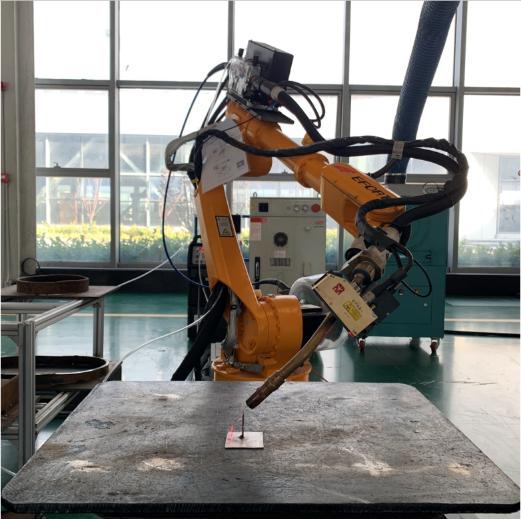
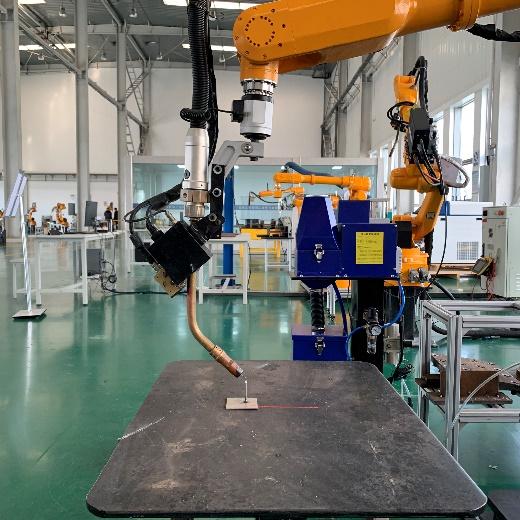
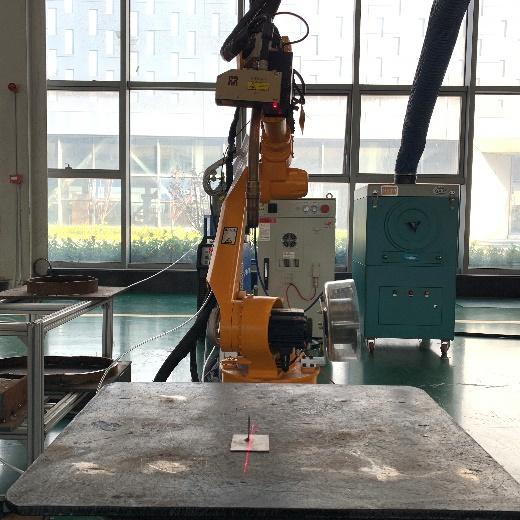
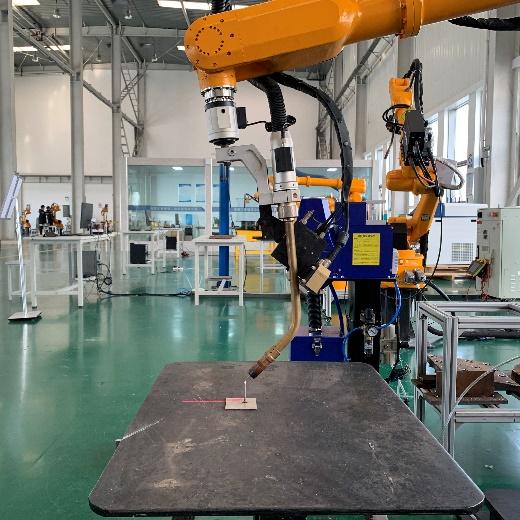
1. Adjust the welding torch to the posture of (A: 180, B: 0, C: 0), aligning it vertically with the calibration workpiece so that the welding wire just touches the tip of the workpiece.

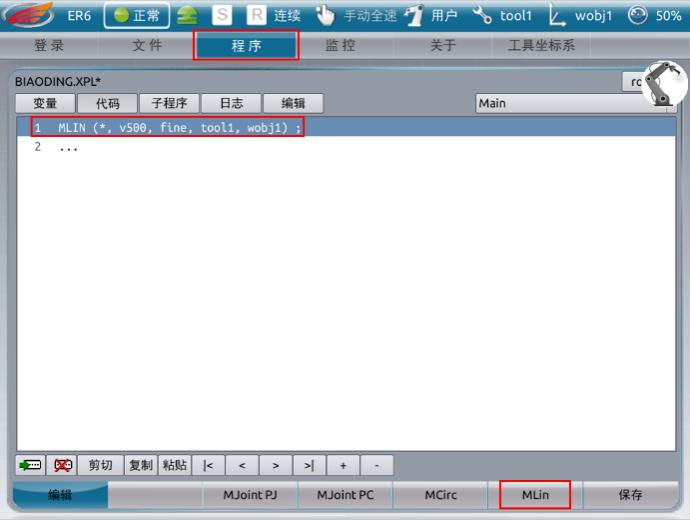
2. Use the MLin command in the program to record this point for use in the subsequent calibration of points 4 to 6.

Step - 4

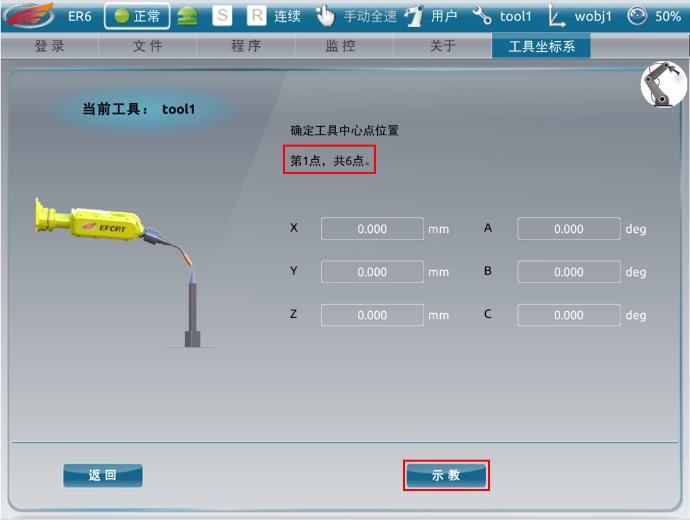
Calibrate the first point. Press the 6+ (RX) key on the teach pendant to rotate the robot counterclockwise around the X-axis. Align the welding wire with the tip of the calibration workpiece, then click Teach.

Step - 5

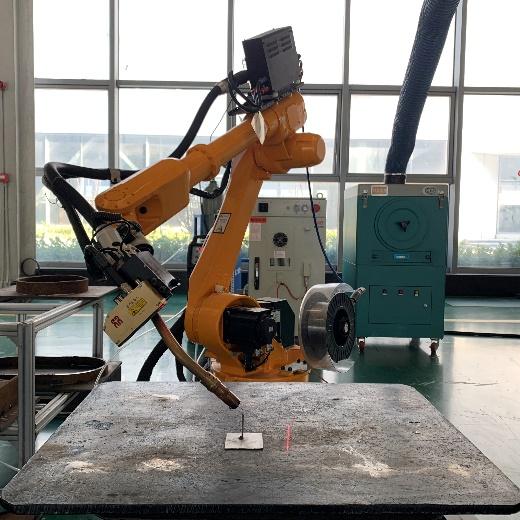
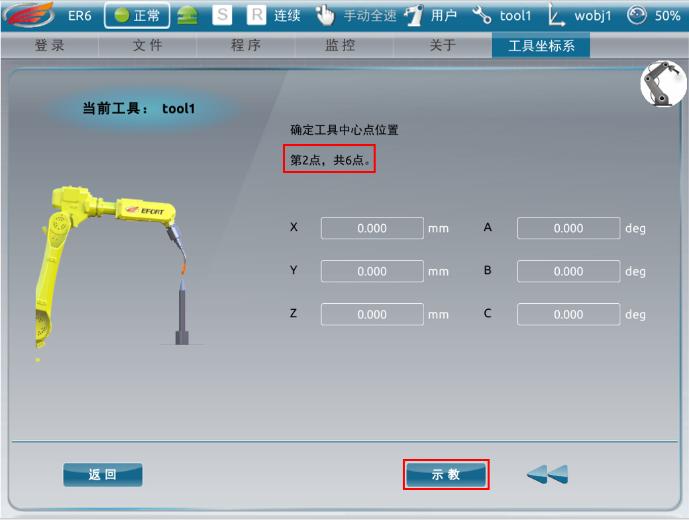
Calibrate the second point. Press the 6− (RX) key on the teach pendant to rotate the robot clockwise around the X-axis. Align the welding wire with the tip of the calibration workpiece, then click Teach.

Step - 6

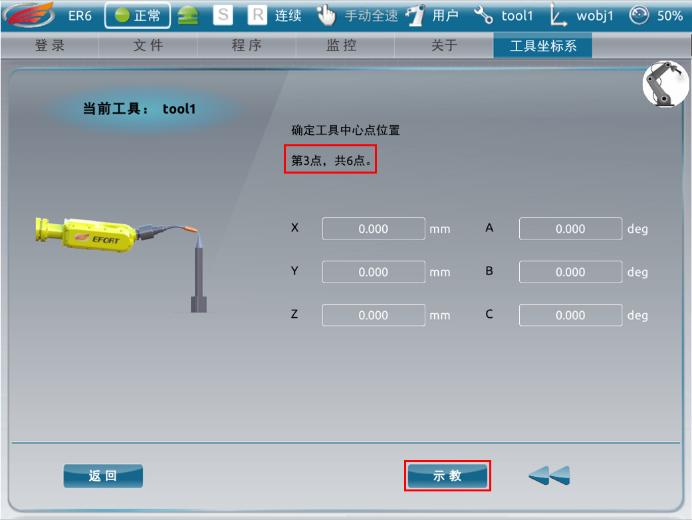
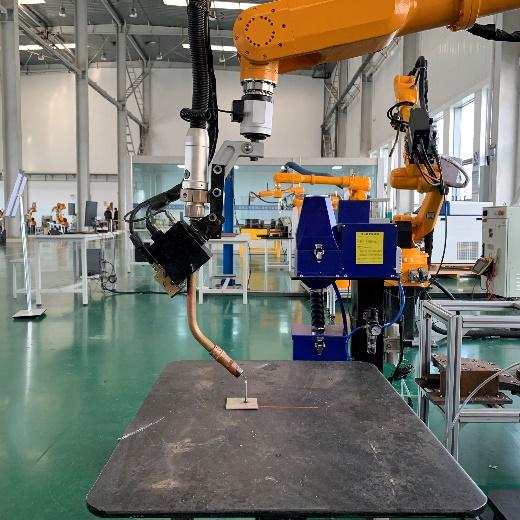
Calibrate the third point. Press the 5+ (RY) key on the teach pendant to rotate the robot approximately 45 degrees counterclockwise around the Y-axis. Align the welding wire with the tip of the calibration workpiece, then click Teach.

Step - 7

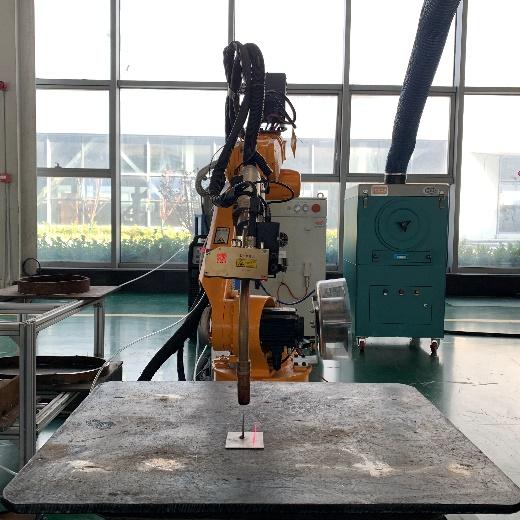
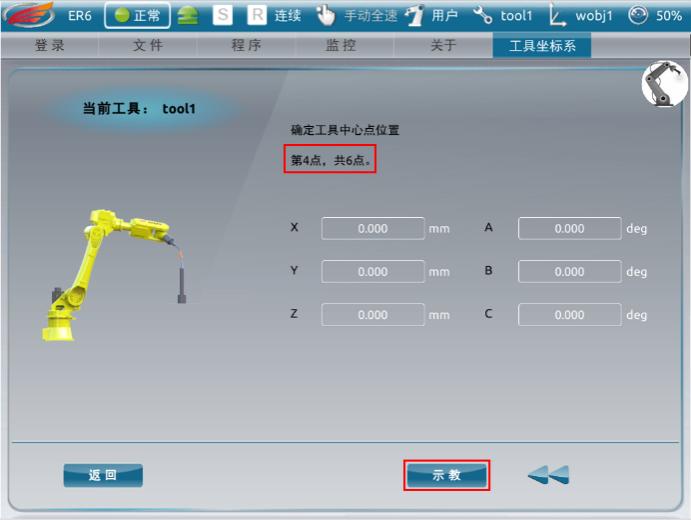
Calibrate the fourth point. Run the previously recorded program so that the TCP aligns vertically with the calibration workpiece, and the welding wire just touches the tip of the workpiece. Then click Teach.

Step - 8

Calibrate the fifth point. Run the program to return to the vertical posture. From the fourth point position, press the 3+ key to move in the positive Z-axis direction by more than 200 mm, then click Teach.

Step - 9

Calibrate the sixth point. Run the program to return to the vertical posture. From the fourth point position, press the 1− key to move in the negative X-axis direction by more than 200 mm, then click Teach.

Step - 10

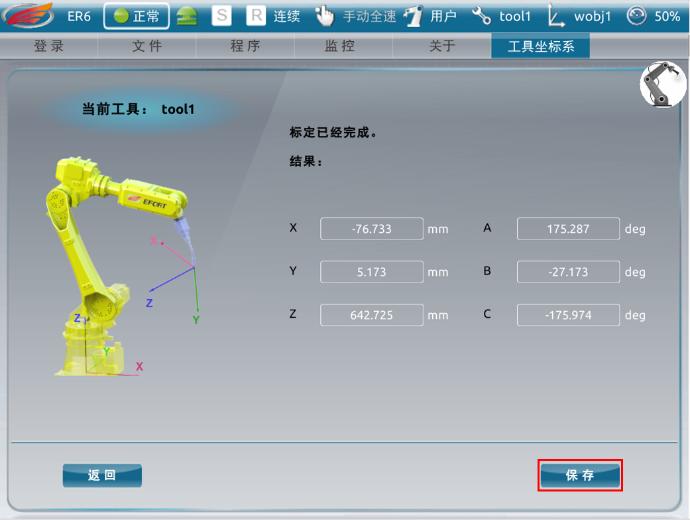
After completing the calibration, click Calculate and then Save.

Welding Torch Calibration Verification Method

Step - 1

After calibration is complete, activate Tool 1, adjust the welding torch to the posture of (A: 180, B: 0, C: 0), and align it vertically with the calibration workpiece so that the welding wire just touches the tip of the workpiece.

Step - 2

1. Press the 5+ key on the teach pendant to rotate the welding torch 45 degrees around the Y-axis. You can view the real-time torch angle in Monitor > Position. Observe whether there is any deviation during rotation.

2. If there is deviation in the Z-axis direction, adjust the X value; if there is deviation in the X-axis direction, adjust the Z value. The values can be checked in Monitor > Position.

(Note: When modifying the values, return the welding torch to the original position. The torch tip must align with the needle tip. Adjust until the torch tip stays aligned with the needle tip while rotating around the Y-axis. Ensure the deviation is within 1 mm. You may repeat the correction multiple times.)

Step - 3

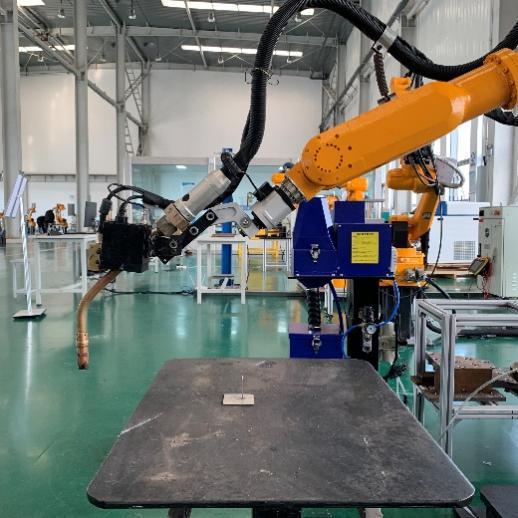
1.  Adjust the welding torch to the posture of (A: 180, B: -45, C: 0) — the welding posture.

2. Press the 4+ key on the teach pendant and observe whether there is any deviation during rotation around the Z-axis.
If there is deviation in the Y-axis direction, adjust the Y value in Tool 1.
Continue adjusting until the welding torch rotates 360 degrees around the Z-axis and the torch tip remains aligned with the tip of the workpiece within a 1 mm margin of error. Once this is achieved, the correction is complete.

Comments Box SVG iconsUsed for the like, share, comment, and reaction icons
Cover for Shaanxi Jingtai Cooperation Laser technology Co.,Ltd
Shaanxi Jingtai Cooperation Laser technology Co.,Ltd

Shaanxi Jingtai Cooperation Laser technology Co.,Ltd

857,114 Likes

Intelligent robot workstations, intelligent work islands, providing the entire process (cutting, assembly, welding, grinding, inspection, etc.) of intelligent applications for the non-standard metal structure manufacturing industry.

Fans and friends brought components from their factory to our company for inspection and trial welding.

No programming was required.

We could choose any one and place it on our welding workbench.

We only accelerated the unedited content of the following test.

We can see the impact of robot vision on this component.

It scanned the welding seams of the outer and inner circles and uploaded the program to the robot.

Then the welding started.

From moving into position to starting the arc, it took about one minute.

The robot continuously welded all the seams on the outer and inner circles.

This is the welded result.

Later, the customer requested to test multi-layer and multi-pass welding.

Compare this welding process with the 600 welders in your factory who work every day.

Which welding looks better?
See MoreSee Less

2 days ago

💡 Jensen Huang says China is pulling ahead in the AI race for three compelling reasons. This technological edge is translating directly into industrial innovation, as seen in advanced solutions like dual-robot welding workstations that are redefining efficiency and precision in manufacturing. A clear sign of what's to c#FutureOfManufacturingu#AILeadershipr#industrialautomationation See MoreSee Less

3 days ago

💡 Jensen Huang says China is pulling ahead in the AI race for three compelling reasons. This technological edge is translating directly into industrial innovation, as seen in advanced solutions like dual-robot welding workstations that are redefining efficiency and precision in manufacturing. A clear sign of what's to c#FutureOfManufacturingu#AILeadershipr#industrialautomationation See MoreSee Less

3 days ago

Facing the diversified construction conditions of the power tower industry, our intelligent robotic welding system delivers stable, beautiful weld seams while redefining the production process.

Simply place the components — no model import required.

With advanced visual imaging and reverse modeling, the system automatically performs path planning for fully automated welding. Robots operate autonomously along the ground track, completing the entire process from the first weld to the last without human intervention.

After finishing one side, the system automatically turns the component and continues welding on the other side.

One operator can manage multiple intelligent welding lines at the same time.

This solution significantly reduces reliance on highly skilled welders, transforming production efficiency and product quality from difficult-to-control variables into predictable, stable, and manageable outputs.

#roboticwelding #industrialautomation #SmartManufacturing #powertower #WeldingTechnology
See MoreSee Less

3 days ago
Load more

Latest News

Contact Details

Subscribe Us

Join our newsletter; you will receive our newest videos/tips of our laser marking, cutting, welding, cleaning and cladding machine’s latest prices and the latest promotional news


You will also get our monthly report of best products, and also coupons.

Inquire Now

Feel free to inquire now. We are always here to help you.

¡Consulta ahora!

Siéntase libre de hacer su consulta ahora. Siempre estamos aquí para ayudarlo.

استفسر الآن

لا تتردد في الاستفسار الآن. نحن دائمًا هنا لمساعدتك.

Связаться сейчас

Не стесняйтесь задавать вопросы. Мы всегда готовы помочь вам.