
Many factories still lose time on manual teaching, repeated fitting, and unstable welds. I see this problem often. Automation should feel simpler, not harder.
An eight-axis cantilever intelligent robotic welding station scans the guardrail structure with large-field 3D vision, builds coordinates, generates welding paths, and starts welding without a pre-imported model. In my site experience, the preparation can take about 3 minutes before stable welding runs for hours.
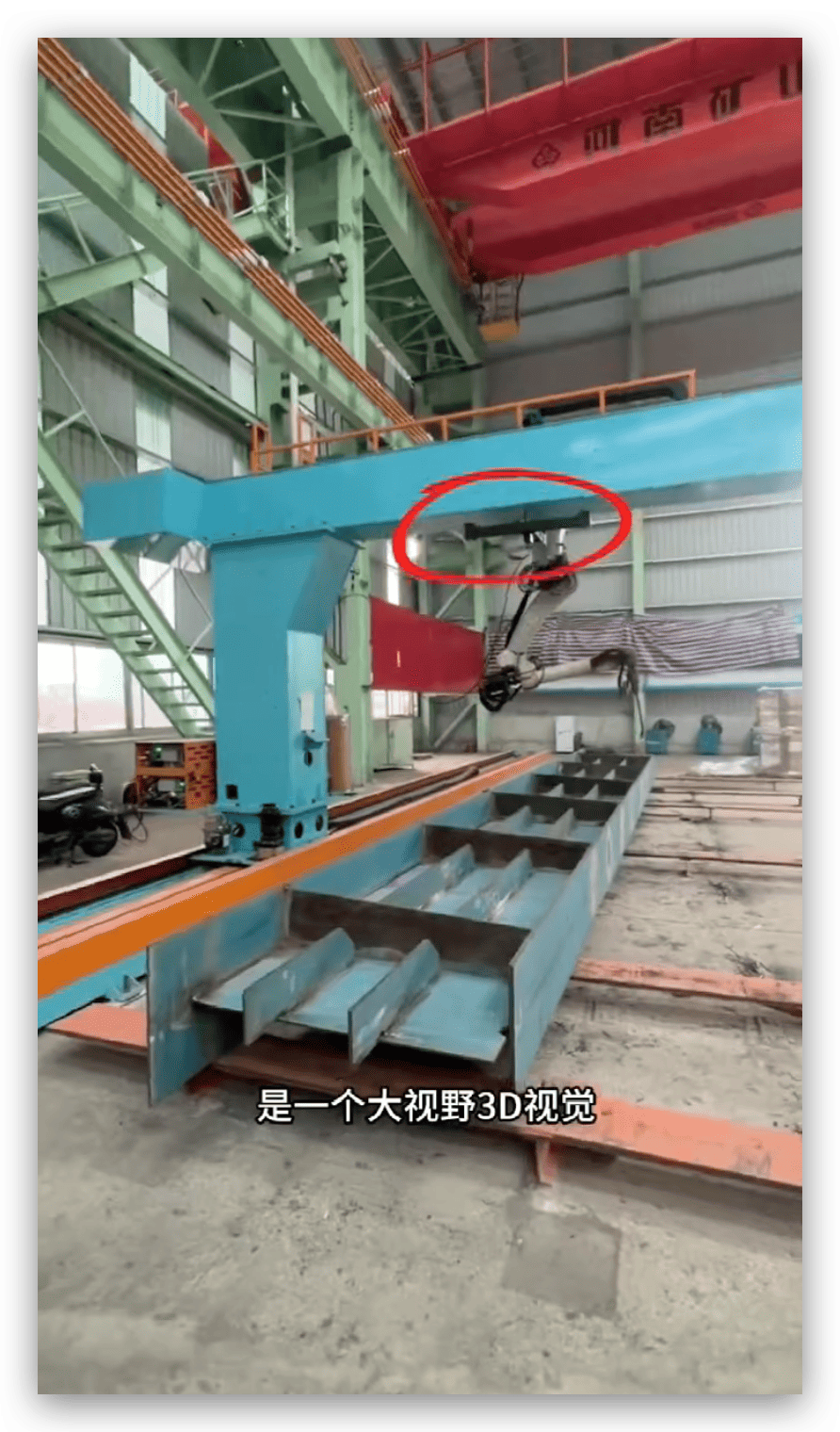
I want to show this application in a very direct way. I do not want to only talk about robot brands, power, or software names. I want to show how the full station works on a real guardrail steel structure site. I also want to explain why this kind of system matters for factories that have many part types, heavy steel parts, and not enough skilled welders.
How Does Large-Field 3D Vision Scanning Create Reverse Modeling And Automatic Welding Paths?
Many robotic welding projects fail before welding starts. I often see the same reason. The robot does not understand the real workpiece position.
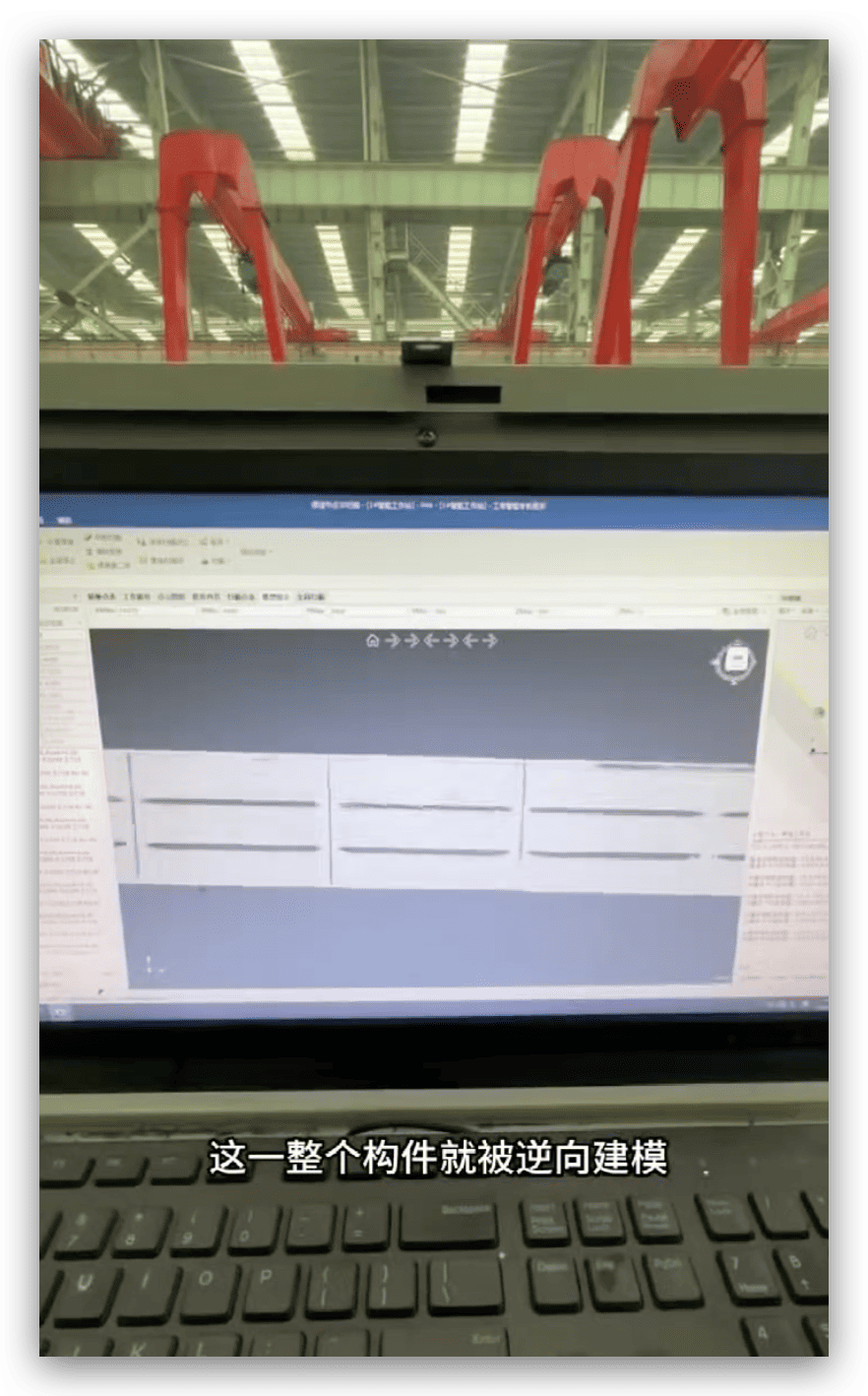
Large-field 3D vision scans the workpiece, creates a reverse model, builds 3D coordinates, and extracts weld seams automatically. The operator does not need to import a CAD model first. The system uses the real part on the table as the welding reference.
What I See On The Guardrail Steel Structure Site
When I stand near this eight-axis cantilever intelligent robotic welding station, I first notice the black device mounted above the cantilever. I do not treat it as a small camera. I treat it as the eyes of the whole system. This device is a large-field 3D vision scanner. It looks down at the guardrail steel structure. It captures the real shape, the real position, and the real deviation of the part.
In a normal robotic welding project, I often see a different process. The engineer imports a 3D model. The programmer sets points. The operator checks the fixture. The robot runs slowly for testing. Then the team adjusts the point again. This process can work for mass production. It can work when the same part comes again and again. It becomes painful when the factory has mixed orders.
Guardrail steel structures often look simple from far away. I know they are not always simple on the shop floor. The parts may have small position errors. The tack welding may not be exactly the same. The steel may have some bending. The fixture may hold the part well, but it cannot remove every difference. When a robot follows a fixed path only, it may miss the seam, touch the part, or create bad weld appearance.
The 3D vision system changes this logic. I do not need to force the real part to match a perfect drawing. I let the system read the real part first. Then the robot creates the path based on the actual position. This is the part that makes the station practical for a real fabrication site.
How The System Builds A Practical Welding Reference
The large-field 3D vision system takes images and point cloud data from the workpiece below. The software then carries out reverse modeling. I use the word “reverse” because the system starts from the physical workpiece, not from the CAD model. It finds the main edges, surfaces, weld seam areas, and spatial position. Then it creates a coordinate base for robot movement.
The operator only needs to click in the system to create the reference position. I like this step because it makes the operation closer to the way a production worker thinks. The worker does not need to write code. The worker does not need to understand every robot coordinate detail. The worker only needs to follow the interface and confirm the reference.
After this, the software extracts the welding path. It understands where the welds are. It also sends motion data to the robot. The eight-axis cantilever design gives the robot more working range and more flexible access. This is useful for long steel structures and repeated weld seams along a guardrail frame.
| Site Element | What I Notice | Why It Matters |
|---|---|---|
| Large-field 3D scanner | It scans the full workpiece area from above | I can reduce manual point teaching |
| Reverse modeling | It builds the part shape from the real object | I can handle part deviation more easily |
| 3D coordinate setup | It creates the robot reference automatically | I can avoid many setup mistakes |
| Automatic seam extraction | It finds the welding path from the scanned data | I can save programming time |
| Eight-axis cantilever | It increases reach and motion flexibility | I can weld larger guardrail structures |
Why I Care More About Real Part Data Than Perfect Model Data
I have met many customers who already have drawings. I have also met many customers who do not have clean 3D models for every workpiece. Some factories receive drawings from different clients. Some factories cut and fit parts on site. Some factories make small changes during production. In these cases, a perfect model-based workflow can slow the factory down.
I do not say CAD models are useless. They are very useful for standard production. I only say that a real site needs another layer of intelligence. The robot must understand the actual workpiece in front of it. This is why 3D vision scanning is important.
I also care about the operator’s confidence. If the system asks too much from the worker, the worker will not use it well. If the system lets the worker click, confirm, and start, the worker becomes more willing to use automation. I have seen this many times. A good machine must be powerful, but it must also feel clear to the person who uses it every day.
How This Helps Guardrail Steel Structure Production
Guardrail steel structures often have repeated welds. They also often have long frames, cross members, plates, and brackets. The weld seams may repeat, but the exact part position can change. This makes the job suitable for an intelligent robotic welding station.
The 3D vision system gives the robot a strong start. The robot does not guess. The robot scans first. The robot builds the path from the scan result. Then the welding process can follow stable parameters.
I usually explain it like this to customers. The scanner gives the robot “where to weld.” The welding power source gives the robot “how to weld.” The robot arm gives the system “how to move.” The cantilever gives the system “how to cover the working area.” The software connects all these parts.
| Function | Simple Meaning | Result On Site |
|---|---|---|
| Scan | I capture the workpiece shape | I know where the part really is |
| Build coordinates | I set the space reference | I reduce position errors |
| Extract seams | I find the weld path | I reduce programming work |
| Send robot path | I guide robot motion | I improve repeatability |
| Weld | I apply stable parameters | I get more consistent welds |
What I Usually Check Before I Trust The Scan
I still believe a machine should be checked. I do not just watch a scanner and assume everything is right. Before I trust the scan, I usually check the workpiece placement, the visibility of weld seams, the lighting around the area, the cleanliness of reflective surfaces, and the scanner coverage. These details look small, but they affect stability.
I also ask the operator to keep the basic production habit. The part should be placed within the working range. The fixture should not block the weld seam. The cable should not disturb the robot path. The shielding gas should be stable. The wire feeding should be smooth. A smart robot still needs a proper welding environment.
This is the reason I like to call the system “intelligent,” not “magic.” It is intelligent because it reduces programming, adapts to real parts, and gives the robot useful data. It is not magic because welding still depends on fit-up, materials, parameters, and process control.
How Can The Station Start Without Importing A Model And Finish Preparation In About 3 Minutes?
Many factories think automation means long preparation. I understand that fear. I have seen projects where programming took longer than welding.
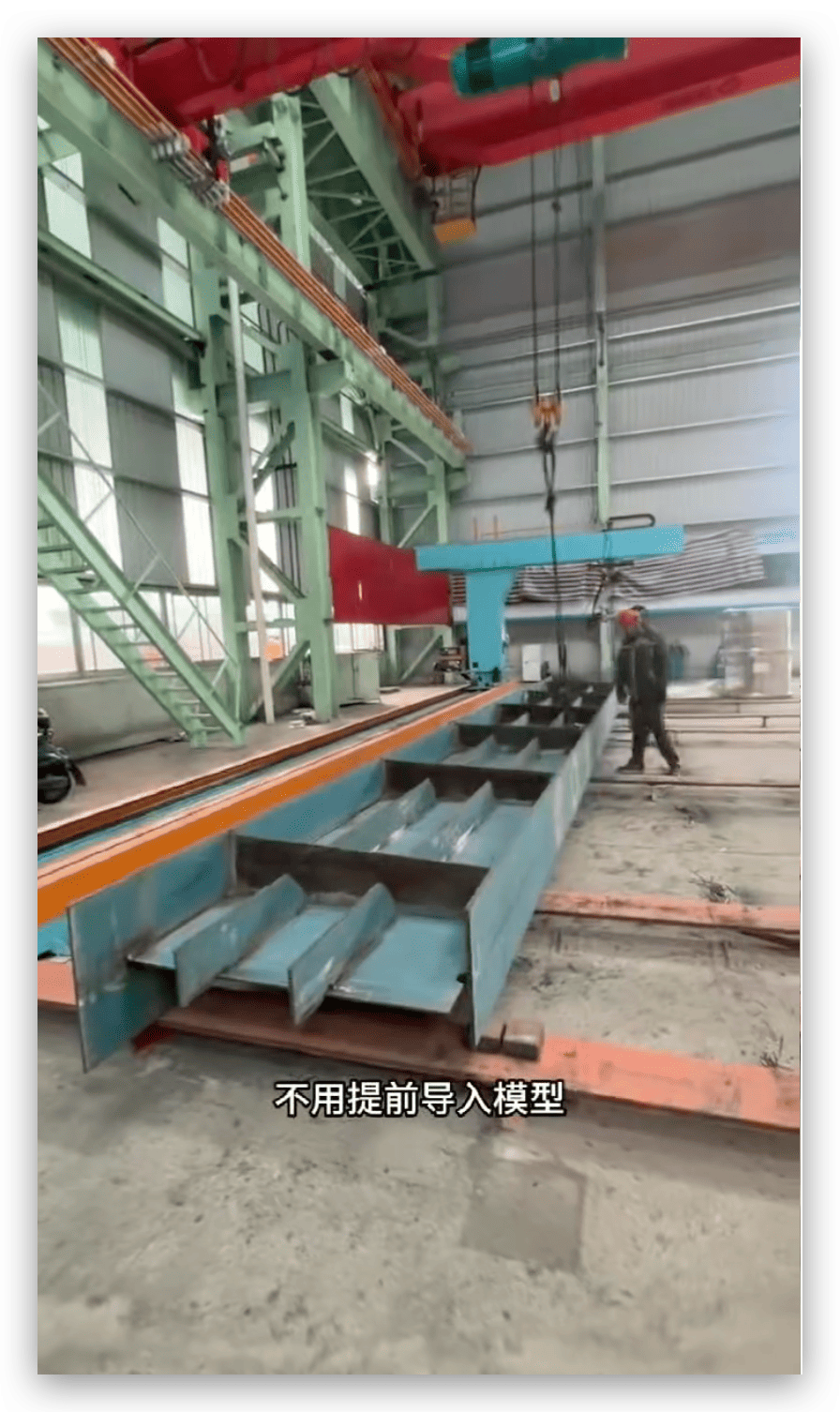
This welding station does not need a pre-imported model for this application. The operator places the part, clicks to create the base point, lets the system scan, and starts automatic welding. In the site case I observed, the preparation took about 3 minutes before continuous welding began.
Why “No Model Import” Is A Big Change For Real Workshops
I have worked with many metal fabrication workshops that do not have a perfect digital workflow. They may have drawings, but they may not have full 3D models. They may have 3D models, but the model may not match the actual part after cutting, bending, and tack welding. They may also produce many different steel structures in one week. This is common in guardrail, frame, pipe support, and equipment structure production.
When a robotic welding system depends fully on pre-imported models, the workshop must prepare a lot of data before welding. The engineer must manage files. The programmer must check layers and surfaces. The operator must choose the correct program. If a part changes, the team must adjust again. This makes robotic welding look heavy.
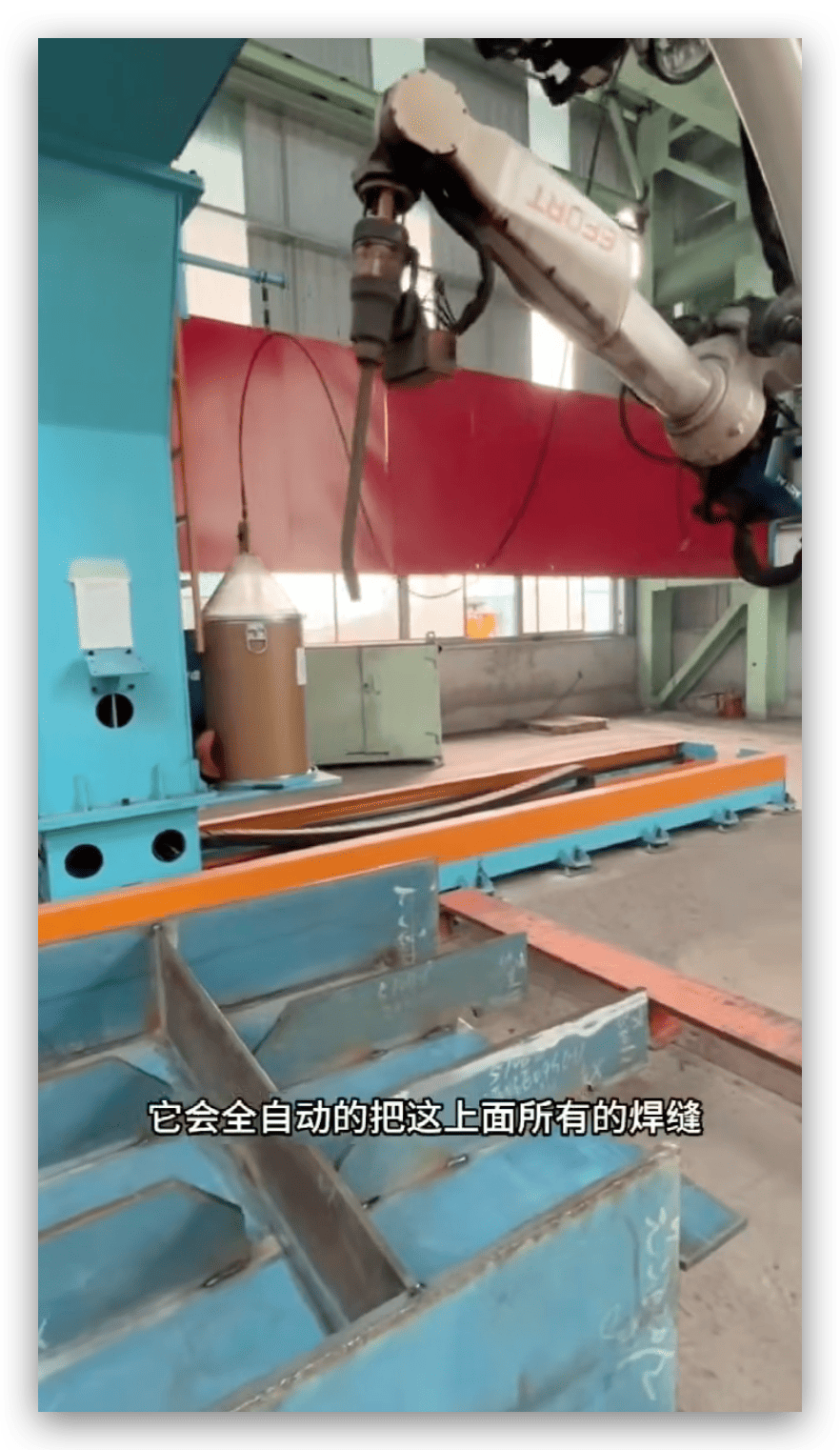
The eight-axis cantilever intelligent robotic welding station removes a large part of this burden. In the site application, I do not need to import the model first. I place the guardrail steel structure under the working area. I let the large-field 3D vision system scan it. I create the base position with a simple click. The system extracts the weld path. Then the robot starts working.
I still need to set the correct welding process. I still need to confirm material thickness, weld type, wire, gas, and laser or arc parameters if the system is matched with different welding methods. But I do not need to spend a long time teaching every weld point by hand.
What Happens During The 3-Minute Preparation
The 3-minute preparation is not empty waiting time. The system is doing several useful jobs. It scans the workpiece. It builds the coordinate system. It checks the position. It identifies the weld seam area. It prepares the path. It sends motion instructions to the robot.
I have seen operators become surprised by this step. Many of them expect a robot project to need a long setup. When they see the scan and path generation happen quickly, they start to understand the value. The system does not ask them to become robot programmers. It asks them to manage the workpiece and the workflow.
| Preparation Step | What I Do | What The System Does | Approximate Purpose |
|---|---|---|---|
| Place workpiece | I put the guardrail structure in the working area | The system waits for scan input | I prepare the physical job |
| Confirm reference | I click to create the base position | The software sets coordinates | I connect the part to robot space |
| Start scanning | I start the scan cycle | The 3D vision captures the part | I get real shape data |
| Generate path | I confirm the result | The software extracts weld seams | I avoid manual programming |
| Start welding | I press start after checking safety | The robot follows the generated path | I begin production |
Why Fast Preparation Matters More Than Many People Think
Some people only compare robot welding speed with manual welding speed. I think this view is too narrow. A factory does not only lose time during the welding arc. A factory also loses time during waiting, measuring, teaching, rework, fixture adjustment, and operator changeover. These small delays become large losses in one month.
Fast preparation matters because it protects the whole production rhythm. If I can prepare one part in about 3 minutes, I can move from one guardrail structure to the next with less stop time. If I can avoid manual teaching, I can reduce the need for a skilled robot programmer on every shift. If the robot can weld for hours after setup, I can plan production more calmly.
I also care about high-mix, low-volume work. Many factories do not have the luxury of welding the same part for six months. They may produce one batch today and another batch tomorrow. Traditional automation often struggles here. Intelligent scanning and automatic path generation make automation more useful for this kind of factory.
What I Watch During Continuous Stable Welding
After the preparation ends, the robot starts welding. I usually watch the first weld seam carefully. I look at the arc or laser spot behavior, the wire feeding, the travel speed, the torch angle, and the weld pool. I also listen to the process. A stable welding sound tells me a lot. I then check the bead shape, the connection at starts and stops, and the penetration based on the material and process.
When the system works well, it can weld continuously for several hours. This is where the value becomes more obvious. Manual welders get tired. Their hand speed changes. Their torch angle changes. Their attention changes. A robot does not get tired in that way. It still needs supervision, consumables, gas, and maintenance. But its movement can stay stable.
For guardrail steel structures, weld consistency is important. The parts may be used in public infrastructure, industrial sites, roads, or safety areas. A bad weld can cause rework or risk. A consistent weld can reduce inspection pressure. It can also make the product look more professional.
| Welding Factor | Manual Welding Challenge | Robotic Welding Advantage |
|---|---|---|
| Travel speed | I may see speed change by worker habit | The robot keeps programmed speed |
| Torch angle | I may see angle drift during fatigue | The robot keeps stable posture |
| Weld position | I may see seam tracking errors | The scan helps locate real seams |
| Long working time | I may see fatigue after hours | The robot can continue steadily |
| Appearance | I may see different bead styles | The system gives more repeatable results |
Why I Still Train Operators Even When Programming Is Not Needed
I do not tell customers that no programming means no training. That would be wrong. The operator still needs to understand the machine. The operator should know how to load the workpiece, check the scan, confirm the path, choose the correct welding recipe, check safety areas, replace consumables, and react to alarms.
The difference is that the training becomes more practical. I do not need every operator to become a robot code expert. I need the operator to understand the production process. I need the operator to know what a good weld looks like. I need the operator to know when to stop the machine and ask for support. This is much easier for most factories.
I also support remote training and on-site training because each customer site is different. The material thickness can change. The fixture can change. The weld size can change. The layout can change. I have learned that installation is not only about turning on the machine. It is about helping the customer build a stable working method.
What Makes This System Different From Traditional Teaching
Traditional teaching uses manual point setting. The operator moves the robot to one point, records it, moves to another point, records it, and repeats this process. This method is accurate when done well. But it takes time. It also depends on the skill of the programmer.
The intelligent station uses scanning and automatic path generation. I see it as a different workflow. The system first reads the part. Then the software creates a path. The operator checks and starts. This reduces the repeated manual work.
I still think traditional teaching has a place. It can be useful for fixed parts, simple batches, and special welds. But for guardrail steel structure sites with many similar but not perfectly identical parts, scanning-based operation gives a better balance between automation and flexibility.
| Workflow Type | Main Input | Skill Need | Best Use Case |
|---|---|---|---|
| Manual teaching | Robot points set by programmer | High robot programming skill | Fixed products and stable fixtures |
| Model import | CAD model and offline program | Strong digital data management | Standard parts with accurate models |
| 3D vision path generation | Real scanned workpiece | Practical operator training | Mixed steel structures and site deviation |
How Can One Or Two Operators Manage A Whole Row Of Robots And Improve Welding Efficiency?
Many factories cannot find enough skilled welders. I hear this concern often. The problem becomes worse when orders increase suddenly.
One or two trained operators can manage a row of intelligent robotic welding stations because the robots scan, generate paths, and weld automatically. The operators focus on loading, confirmation, process checks, consumables, and quality inspection instead of manual welding or repeated programming.
What I See When A Row Of Robots Works Together
When I watch a full row of robots working at a guardrail steel structure site, I see a different kind of workshop rhythm. I do not see one welder tied to one seam all day. I see one or two operators walking between stations. They check the loading. They confirm the scanning result. They start the cycle. They inspect weld quality. They prepare the next part. The robots do the heavy and repeated welding work.
This change matters. Many factories try to hire more welders when production grows. That solution is harder now. Skilled welders are not always available. Young workers may not want long hours of hot and tiring welding work. Experienced welders may cost more each year. Factory owners feel pressure from both labor cost and delivery time.
The intelligent robot station gives another path. I do not need to replace every worker. I need to change the worker’s role. The worker becomes a production controller, machine operator, and quality checker. The robot becomes the repeated welding hand. This division is more sustainable for many factories.
How The Operator’s Job Changes
In manual welding, the worker spends most of the time holding the torch and controlling the weld pool. The worker must keep body position, torch angle, travel speed, and heat input. This is skilled work. It is also tiring work.
In robotic welding, the operator manages the process. The operator loads or confirms the part. The operator uses the interface. The operator checks the scan. The operator watches the first weld. The operator checks the final bead. The operator handles wire, gas, nozzle, lens, or other consumables depending on the welding process. The operator also keeps the working area safe.
This role change allows one operator to manage more than one station. If the station has stable scanning and automatic path generation, the operator does not need to spend long time at each robot. The operator can move along the row.
| Worker Role | Manual Welding Site | Intelligent Robot Welding Site |
|---|---|---|
| Main task | I weld each seam by hand | I manage several robot cycles |
| Skill focus | I control hand movement | I control process and quality |
| Time use | I stay at one workpiece | I move between stations |
| Fatigue level | I face heat, smoke, and posture strain | I reduce direct welding exposure |
| Output stability | I depend on personal skill | I depend on system repeatability |
Why Efficiency Improves In More Than One Way
Many people think efficiency only means faster welding speed. I think efficiency includes at least five things. It includes preparation time, arc-on time, defect rate, labor use, and production planning. A robotic welding station can improve all five when the application is suitable.
The preparation time improves because the 3D vision system reduces manual programming and adjustment. The arc-on time improves because the robot can keep working without human fatigue. The defect rate can improve because the path and movement are repeatable. The labor use improves because one or two operators can manage several robots. The planning improves because the output becomes easier to predict.
I do not promise the same efficiency gain for every factory. I always ask about part size, weld length, material thickness, fit-up quality, and daily output. But I have seen clear improvement when the workpiece has repeated welds and the factory needs stable production.
| Efficiency Area | Before Automation | After Intelligent Robotic Welding |
|---|---|---|
| Programming | I spend time teaching and adjusting | I use scan-based path generation |
| Welding speed | I depend on welder condition | I use stable robot movement |
| Labor need | I need more welders for more output | I can manage more work with fewer people |
| Weld quality | I see different results from different workers | I see more consistent bead shape |
| Planning | I face more uncertainty | I can estimate cycle time better |
How Consistency Affects Real Factory Profit
Consistency is not only a quality word. It affects profit. If weld quality changes from worker to worker, the factory spends more time on inspection and repair. If weld appearance is poor, customers may complain even when strength is acceptable. If penetration is not stable, the risk becomes higher. If rework increases, delivery becomes late.
With robotic welding, I can control travel speed, angle, path, and process parameters more clearly. When the scan gives correct seam data, the robot can follow the seam with repeatable motion. This helps weld appearance and weld size stay more stable.
I also see another benefit. The factory can train new workers faster. A new operator does not need years of manual welding experience to run the station. The person still needs training and responsibility. But the learning path is shorter than becoming a high-level manual welder. This is important for small and medium workshops that want to upgrade to automation.
What I Usually Tell Customers Before They Buy A Row Of Robots
I do not suggest that customers buy a full row of robots without testing. I usually suggest a careful application review. I ask for photos, drawings, videos, material details, thickness, weld types, and expected production volume. If needed, I suggest a sample welding test. I want the customer to see the weld result before making a large decision.
For guardrail steel structures, I check several things. I check whether the weld seams are visible to the 3D scanner. I check whether the part size fits the cantilever working range. I check whether the material thickness needs a specific welding power. I check whether the fixture can hold the part in a repeatable way. I check whether the customer needs full penetration or surface fillet welding. These details decide the final solution.
I also talk about after-sales support. A robot station is not a simple tool. It is a production system. The customer needs installation, training, spare parts, remote support, and sometimes on-site service. We support both remote and on-site assistance because I know a factory cannot afford long downtime.
Why The Eight-Axis Cantilever Design Fits Large Steel Structures
The eight-axis cantilever design gives the system more working freedom than a standard robot arm placed beside a small table. The cantilever can cover a wider area. The robot can reach longer workpieces. The extra axis helps the robot adjust its position across the structure. This is useful for guardrail frames and other long steel components.
In a fixed robot cell, the workpiece must often fit into a limited space. For large steel structures, this can be difficult. The cantilever design gives more room. It also makes it easier to arrange a production line with several stations. The operator can load from one side and manage the row.
I like this layout because it matches real steel fabrication better. Steel structures are not always small, clean, and perfect. They are often long, heavy, and slightly different. The robot station must respect that reality.
| Design Feature | Practical Benefit |
|---|---|
| Cantilever structure | I can cover long workpieces more easily |
| Eight-axis movement | I can improve reach and posture control |
| Overhead vision | I can scan a large area from above |
| Automatic path generation | I can reduce teaching work |
| Row arrangement | I can let one or two operators manage more stations |
What I Notice In The Weld Quality
When I look at the on-site weld quality, I first look at the bead shape. I check whether the bead is even. I check whether the weld toe is smooth. I check whether there is undercut, lack of fusion, spatter, porosity, or bad start and stop points. I also check whether the weld size matches the requirement.
For robotic welding, a stable bead often shows that the process is under control. The robot keeps a steady travel speed. The torch angle stays stable. The path does not shake like a tired hand. If the fit-up is good and the parameters are right, the weld quality can be very consistent.
I also care about penetration. In some applications, full penetration is required. In some applications, a fillet weld with correct size is enough. The correct choice depends on material thickness, joint form, and structural requirement. I always prefer to talk about actual weld needs instead of only talking about machine power. Power is important, but the process match is more important.
How This System Supports Small And Medium Workshops
Some small and medium workshops think robotic welding is only for large factories. I understand that thought. Traditional robot projects often need engineers, programmers, fixtures, and long setup time. The cost and complexity can scare smaller companies.
The intelligent welding station lowers that barrier. It reduces programming needs. It handles mixed work better. It lets fewer operators manage more output. It also gives the owner a clearer way to upgrade from manual welding to automation.
I do not say every small workshop should buy robots immediately. I say many workshops should start to evaluate automation earlier. Labor cost will not become lower in most markets. Quality demands will not become easier. Delivery time will not become longer. A flexible robotic welding station can help a workshop compete with larger suppliers.
How I Explain ROI In Simple Terms
When a customer asks me about return on investment, I do not only calculate robot price. I ask about current labor cost, daily welding hours, rework cost, delivery pressure, and order stability. I also ask how many operators can be reduced or reassigned. I ask whether the robot can run one shift or two shifts. I ask whether the station can handle future products.
ROI becomes clear when the robot solves a real bottleneck. If welding is the slowest step, automation can improve output. If skilled welders are hard to find, automation can reduce hiring pressure. If quality is unstable, automation can reduce rework. If the factory wants to win larger orders, automation can increase confidence.
I like to keep ROI discussions honest. A robot is not just a purchase. It is a production change. The factory must prepare operators, layout, fixtures, materials, and quality control. When these parts are ready, the return can be strong.
Conclusion
I see this station as a practical way to make guardrail steel structure welding faster, steadier, and easier to manage with fewer skilled operators.